Free Public Beta

Free AI eBay listing software for Windows that prices the item, too.

Hand-listing one item is 20–30 minutes of typing. Paste a link or a photo instead and about ten seconds later the listing is written — title, 20+ item specifics, description, photos. Then it prices the item against 900,000+ real eBay sold records. Nothing publishes until you approve it.

Two ways to run it. The browser version needs no install and no card — 5 AI generations a day on our AI key. The Windows download is unmetered: your own PC, your own AI key.

Windows 10 & 11 Free beta — no card Bring your own AI key — no markup Publishes through eBay's official API
ING Listing Engine — Windows desktop app
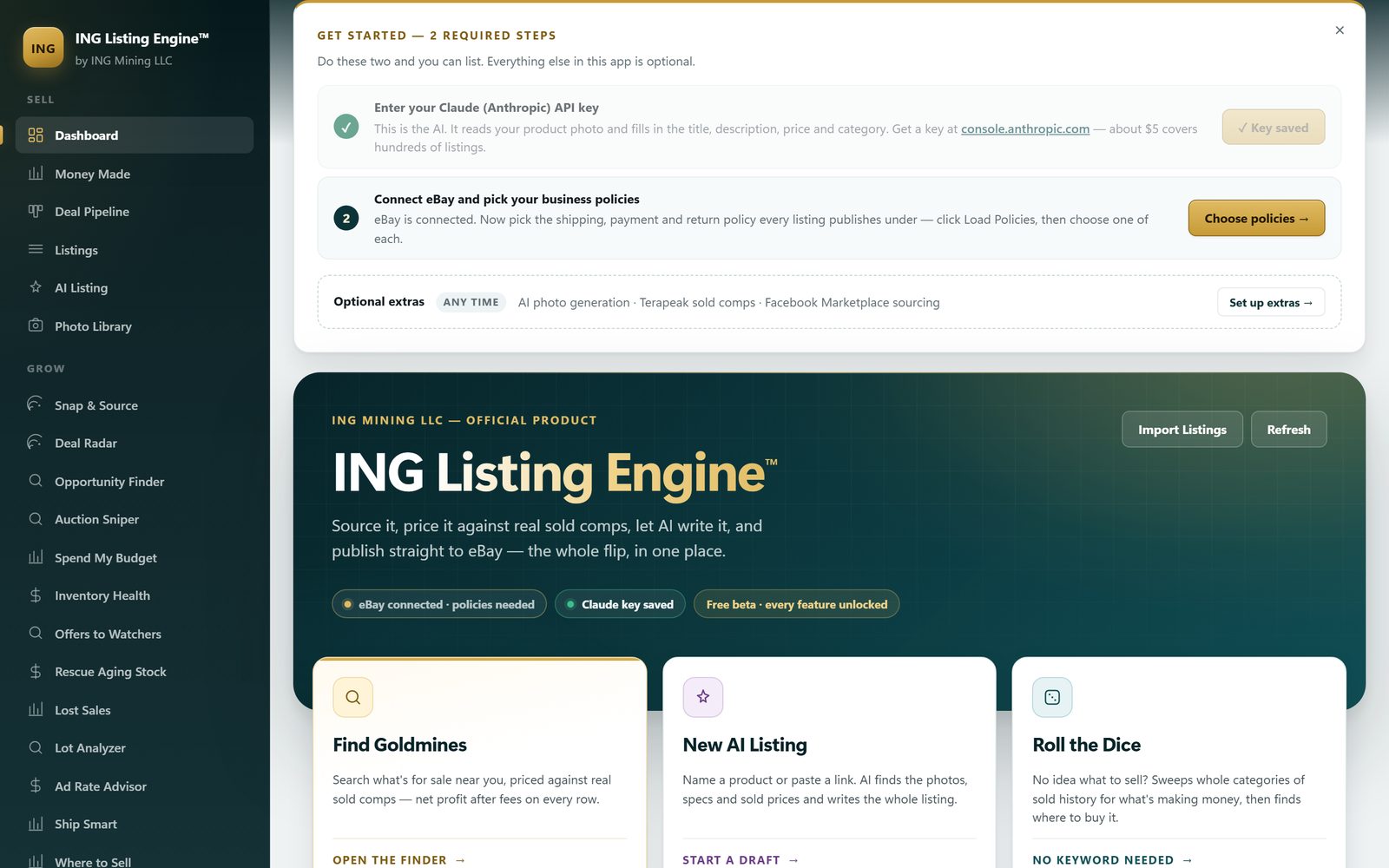
The ING Listing Engine dashboard scrolled to its Get Started panel, which reads that steps 1 and 2 are all you need to list and steps 3 and 4 are optional: the Claude (Anthropic) API key step ticked and marked Key saved, Connect eBay ticked and reading eBay is connected, and Connect Facebook Marketplace marked optional and ticked as connected with local Marketplace search ready, above an Optional extras row offering AI photo generation, listing defaults and a fee profile, with the product banner below it carrying eBay connected, Claude key saved and free beta pills
~10s
Listing Generated
20+
Fields Auto-Filled
900k+
Real Sold Comps
$0
Cost During Beta

From a product link to a live eBay listing.

This is how you list faster on eBay without listing worse: you review what the AI filled and change what you disagree with. No retyping specs, no hunting for a category ID, no second tab open on sold listings.

1

Paste a Product URL

Drop in any URL — your supplier's page, a manufacturer site, another eBay listing, Amazon, wherever you source product info. The AI reads the full page.

2

AI Fills Everything

Claude AI writes a keyword-optimized title, professional HTML description, selects the right eBay category, fills 20+ item specifics, pulls all product photos, and estimates pricing from current eBay sold data.

3

Review & Publish

Scan the AI-filled listing, make any tweaks you want, then hit Publish. The app connects directly to your eBay seller account via OAuth and creates the live listing instantly.

The eBay software for sellers, screen by screen.

Real, unedited screenshots from the current build — click each tab to see exactly what you get.

A name, a URL or a photo — one listing

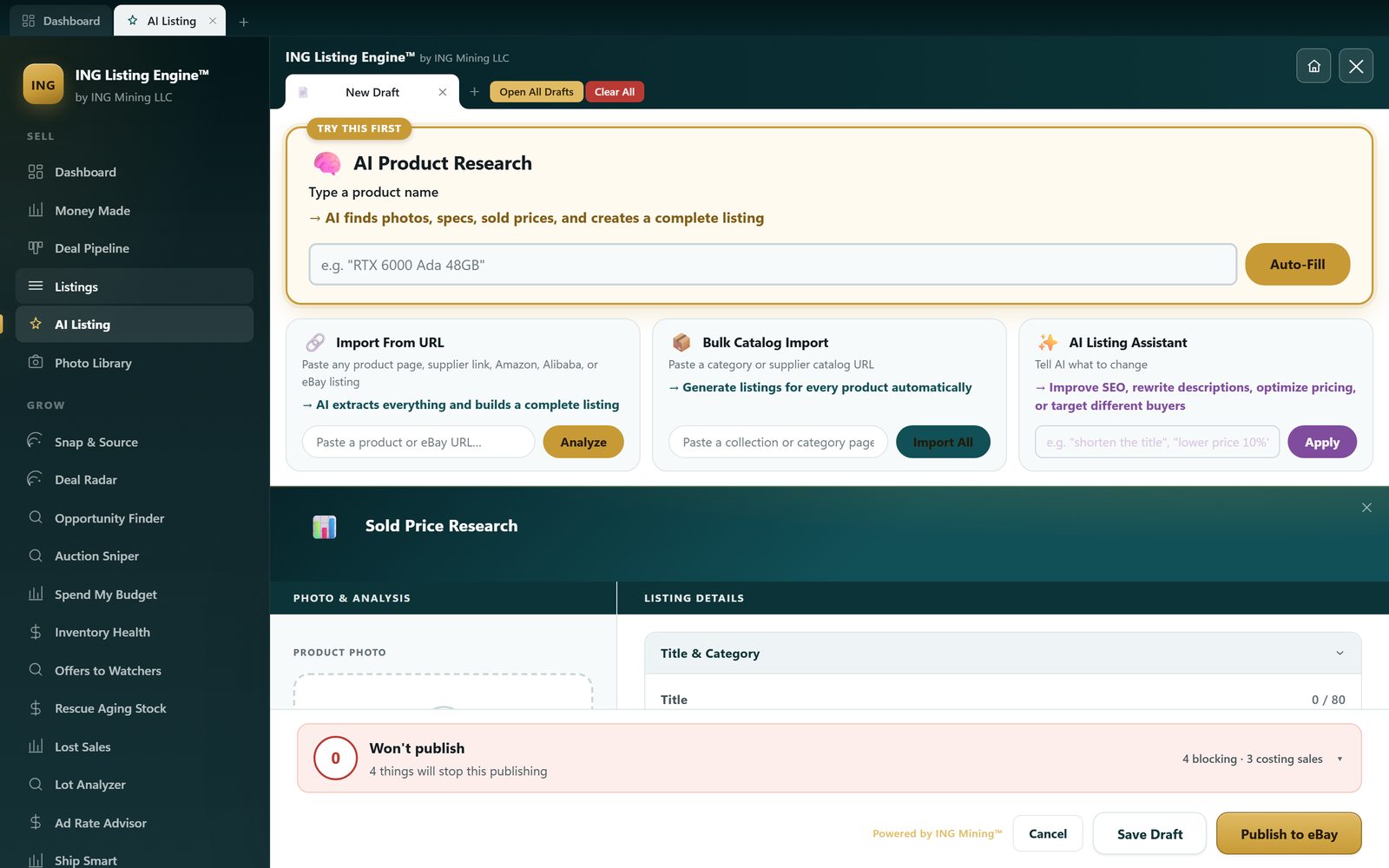
Three ways in, all on one screen. Type a product name into Quick-Fill, paste a supplier or marketplace URL, or drop a photo. The AI writes the title, the HTML description and the item specifics, and the sold-price panel sits right there while you work.

Quick-Fill researches a product from its name alone
URL import reads any product page — no scraper setup
Title counter caps you at eBay's 80 characters
Sold Price Research docks into the editor, not a second tab
A pre-publish check lists what would block the listing before eBay rejects it
The ING Listing Engine AI listing editor open in its own workspace tab on a New Draft, with Open All Drafts, Clear All and Recover beside it: an AI Product Research box marked Try This First that takes a product name and finds photos, specs and sold prices, with an Auto-Fill button; Import From URL, Bulk Catalog Import and AI Listing Assistant panels beneath it; a Sold Price Research band above Photo & Analysis and Listing Details columns; and a red bar reading won't publish, 4 things will stop this publishing, 4 blocking and 3 costing sales, above Cancel, Save Draft and Publish to eBay

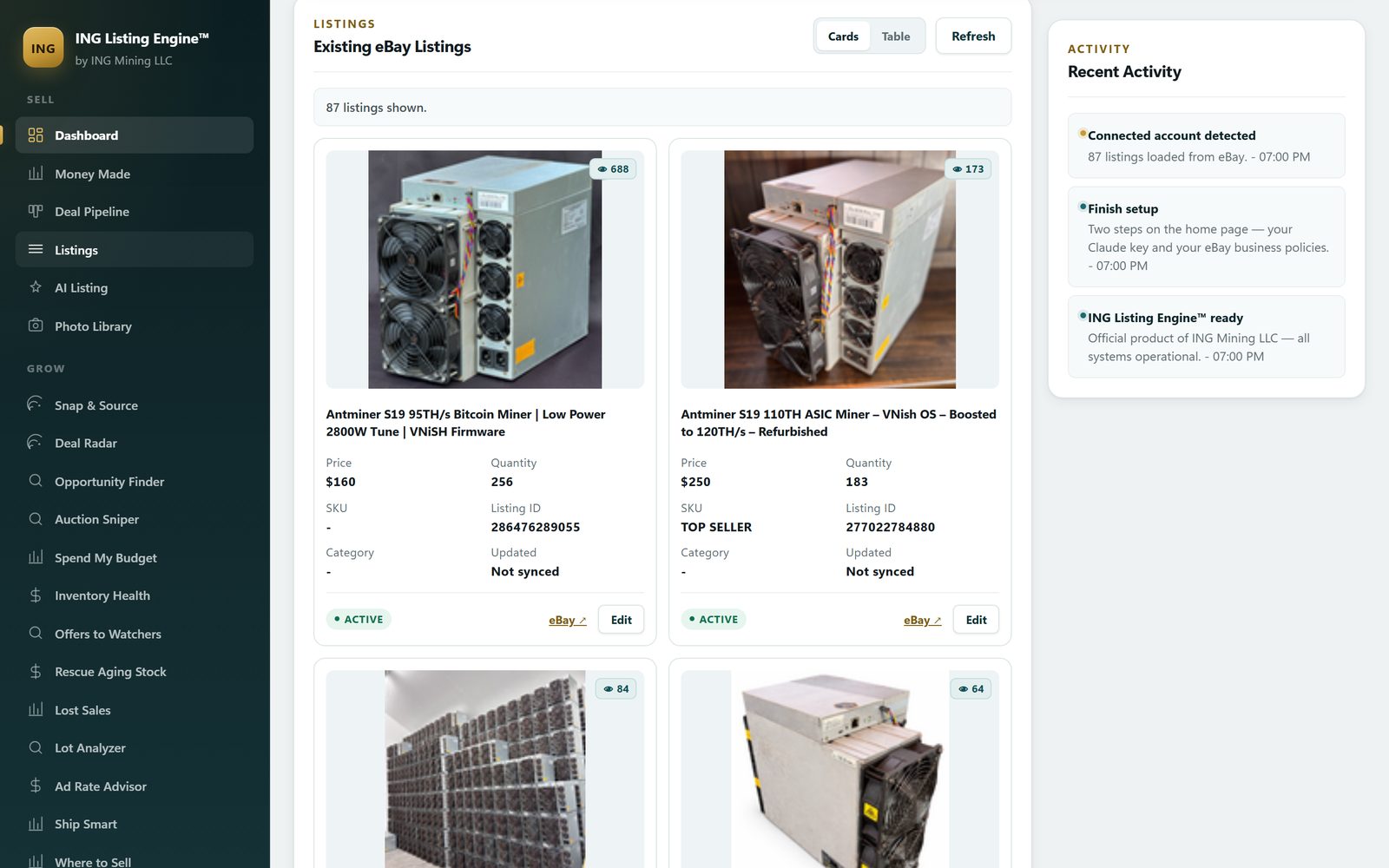
Your real eBay listings, pulled in

Connect the account and the app loads what you already have live — photos, price, quantity, listing ID, watcher count. This is the seller's own store: 87 active listings, mostly ASIC miners and datacentre hardware. Nothing here is a demo account.

Live listings imported over eBay's official Sell API
Watcher count on every card — the number that drives offers
Cards or table, whichever you scan faster
Jump straight to the eBay listing or edit it in the app
The Listings screen headed Existing eBay Listings and reading 89 listings shown, with a Cards and Table toggle and a Refresh button, showing the seller's own live eBay cards - an Antminer S19 95TH low-power 2800W VNiSH-firmware unit at $160, quantity 251, with 692 watchers, and an Antminer S19 110TH VNish OS unit boosted to 120TH at $250, quantity 183, marked TOP SELLER with 176 watchers - both badged ACTIVE with their Category reading a dash and Updated reading Not synced, beside a Recent Activity rail reading connected account detected, 89 listings loaded from eBay

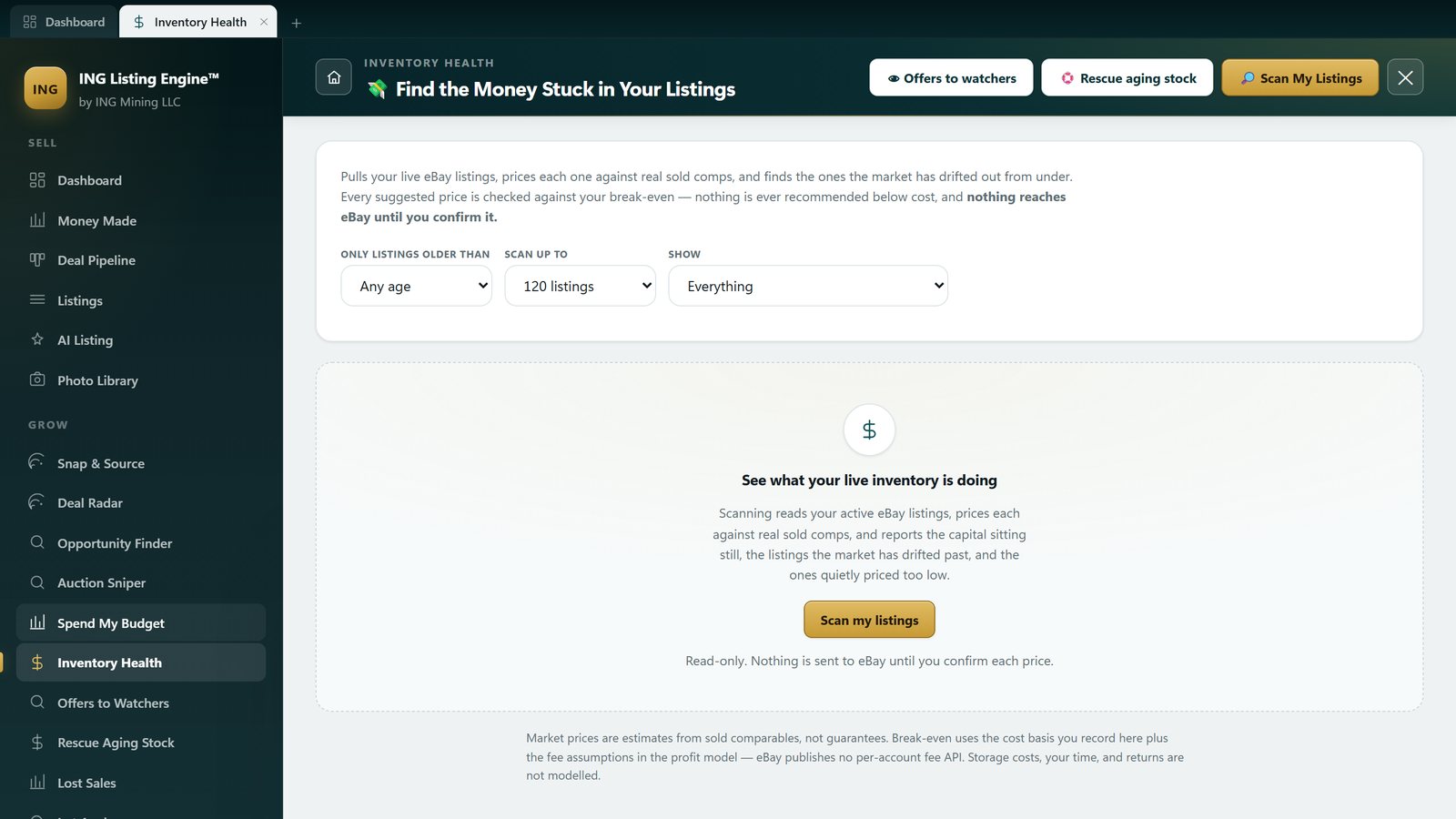
Find the money stuck in old listings

Inventory Health scans what's already live, ages every listing, and compares your price to real sold comps. It proposes a new price — it never sends one. You confirm each change, or none of them.

Ages every active listing and flags the capital sitting still
Prices against sold comps, not against other people's asks
Read-only until you approve — no silent repricing
Leaves listings alone when watchers and sales say they're working
The Inventory Health screen, headed Find the Money Stuck in Your Listings, with Offers to watchers, Rescue aging stock and Scan My Listings buttons in its header, an explanation that it prices every live listing against real sold comps and never recommends below break-even, filters for listing age, scan size and what to show, and a resting state reading see what your live inventory is doing above the note that scanning is read-only and nothing is sent to eBay until you confirm each price

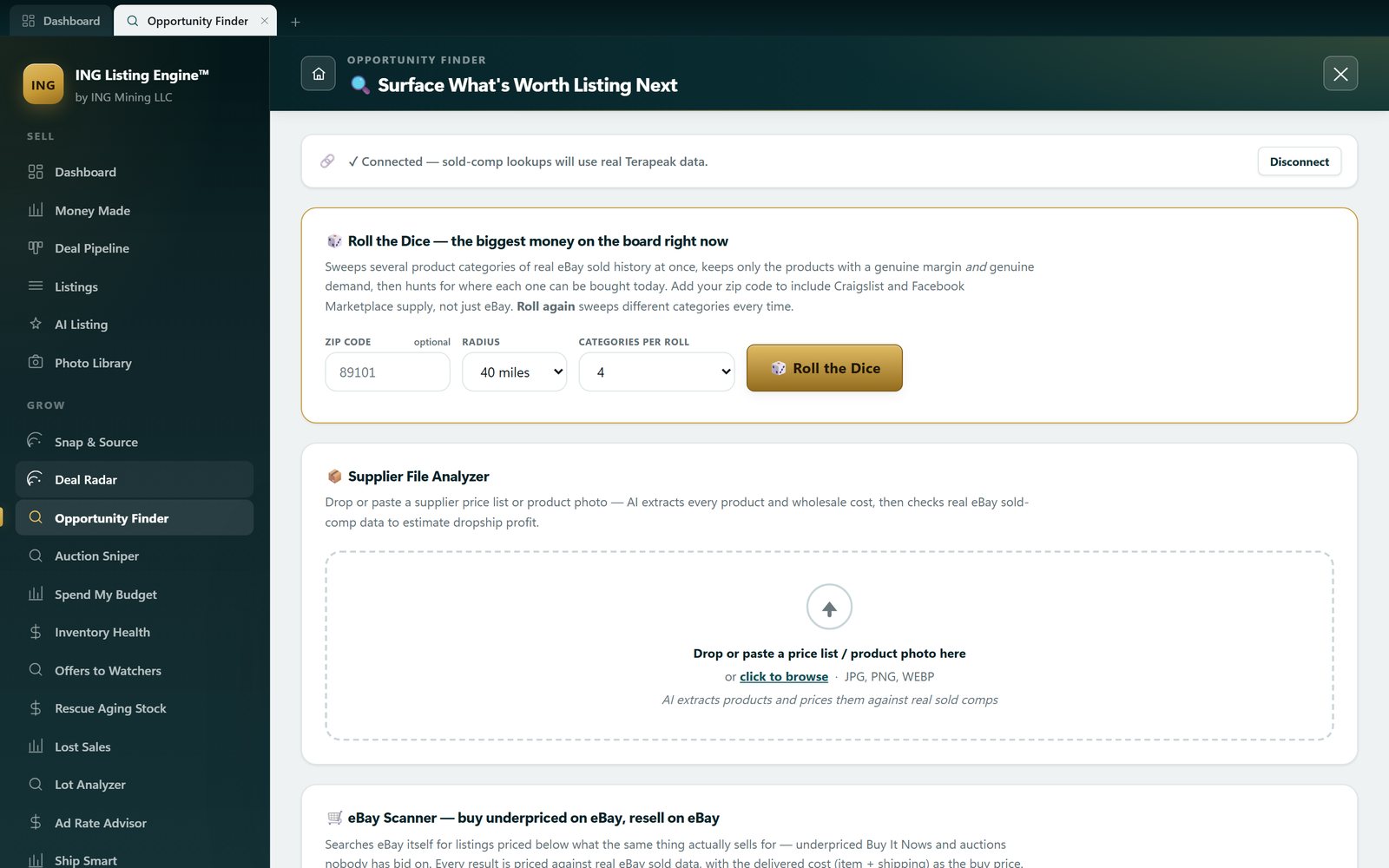
Don't know what to list next?

Opportunity Finder works the other direction: instead of pricing something you own, it sweeps real eBay sold history for products with both margin and demand, then goes looking for where you can buy them today — including Craigslist and Facebook Marketplace near your zip code.

Roll the Dice sweeps whole categories — no keyword needed
Supplier File Analyzer prices a whole wholesale list against sold comps
Local Deals compares local asking prices to eBay sold prices
Craigslist needs no login
The Opportunity Finder screen, headed surface what's worth listing next, with a Roll the Dice panel set to zip code 89101, a 40-mile radius and 4 categories per roll, a Supplier File Analyzer drop zone for a price list or a photo of one, and an eBay Scanner section for buying underpriced on eBay and reselling on eBay

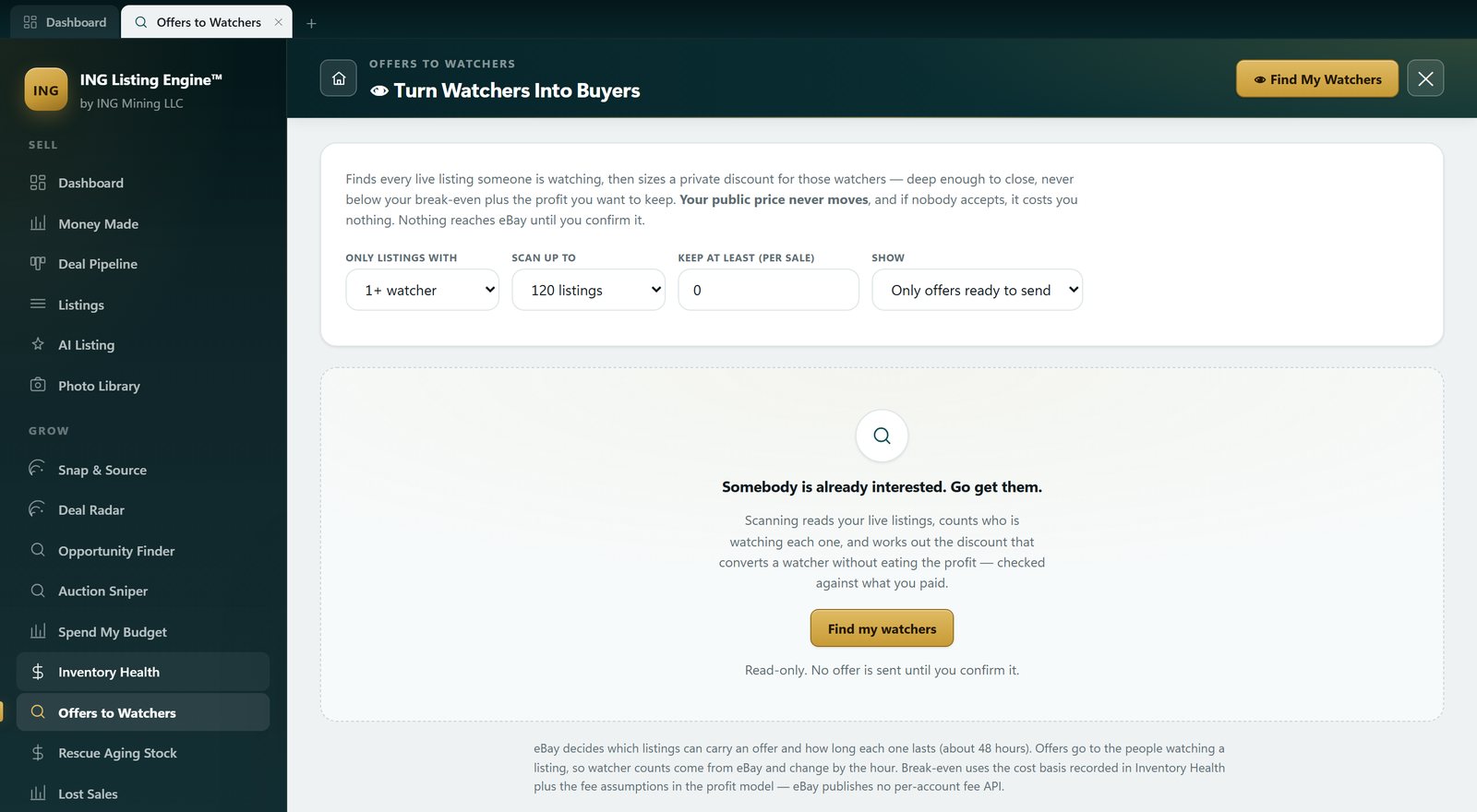
Sell to the people already watching

Someone watching your listing has already decided they want it — they're waiting on the price. Offers to Watchers reads who is watching what, then sizes a private discount that still clears your break-even. Your public price never moves.

Private, time-limited offers — the listing price stays put
Never proposes a number below break-even plus the margin you set
Break-even uses the cost basis recorded in Inventory Health
Costs nothing if nobody accepts
The Offers to Watchers screen, headed Turn Watchers Into Buyers, with a Find My Watchers button, an explanation that it sizes a private discount for watchers that never goes below break-even plus the profit you want to keep and that your public price never moves, filters for minimum watcher count, scan size, the profit to keep per sale and an offers-ready-to-send filter, and a resting state reading somebody is already interested, go get them, above the note that it is read-only and no offer is sent until you confirm it

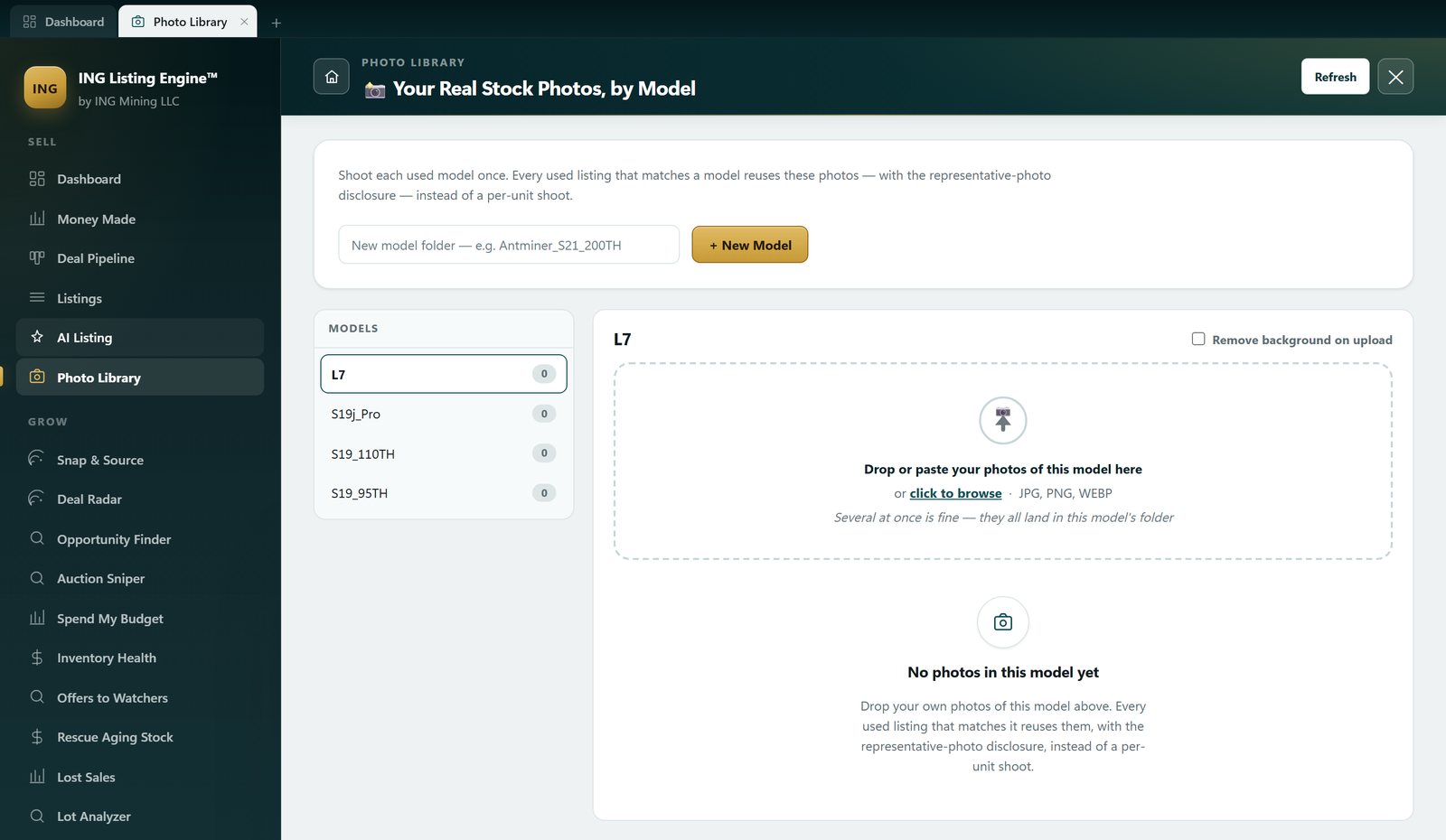
Shoot each model once

If you sell the same used model over and over, photographing every unit is wasted work. Shoot the model once, file it here, and every matching used listing reuses those photos with the representative-photo disclosure attached.

One photo folder per model — S19 95TH, S19j Pro, L7, whatever you stock
Your own photos, not stock images or AI renders
Representative-photo disclosure added automatically on used items
Optional background removal on upload
The Photo Library screen, headed Your Real Stock Photos, by Model, explaining that you shoot each used model once and every matching used listing reuses those photos with the representative-photo disclosure, with a box for naming a new model folder, a models list holding L7, S19j_Pro, S19_110TH and S19_95TH each showing zero photos, a remove-background-on-upload checkbox, and a drop zone reading no photos in this model yet

Everything the eBay listing software does.

Every feature is included, unlocked, and free — no tiers, no upsells.

🔗

URL-to-Listing Import

Paste any product URL and Claude AI reads the page, extracting all listing data automatically — works on any website without configuration.

Bulk Collection Import

Paste a supplier's category page and every product gets processed simultaneously into separate draft tabs — ready to review and publish.

📝

AI-Written Descriptions

Professional HTML descriptions with formatted spec tables, written to maximize eBay buyer engagement and search visibility.

🏷️

Keyword-Optimized Titles

Titles are generated under 80 characters with eBay search keywords included — using real eBay ranking signals.

📋

Automatic Item Specifics

20+ item specifics fields filled per listing including brand, model, MPN, and category-specific fields like hashrate for mining hardware.

📸

Photo Editor Built In

Crop, rotate, adjust, add text, draw shapes, apply filters, and remove backgrounds — all without leaving the app.

💰

Pricing from Sold Comps

Suggested pricing is estimated from current eBay sold comparable data — not just random guesses.

🚀

Direct eBay Publishing

One click publishes your listing live to eBay via the official Sell API — no copy-pasting into Seller Hub.

What's new.

Real, unedited screenshots of the app as it stands in development. Every change since 22 July, dated — and which of it is in the installer you'd download today — is on the changelog.

Every change, dated: read the full changelog →

Learn the workflow.

Written by Nick Squires, who sells miners, servers and industrial gear on eBay — with real sold-comp numbers, not vendor claims.

AI eBay Listing Software: the 2026 guide

How a photo becomes a complete listing, what a sold-comp median is really worth (a real Antminer S19 query moves from $69 to $290 once you filter it properly), and where a competitor is the better answer.

Read the guide →

What AI can read off one photo

The six things a photo can never tell you — power-on, internal specs, battery health, firmware, hours, completeness — and how to shoot the spec plate so identification works the first time.

Read the guide →

Terapeak alternatives, tested not listed

Four live queries against our own 864,000-row sold database. One search for a Dell PowerEdge R740 returned 30,289 “matches” and not a single actual server — which is why keyword-matched price averages mislead you.

Read the guide →

Repricing the listings you already have live

The first scan of our own account found $260,218 sitting in stale listings — and one 138-day listing the discount ladder wanted to cut by $8,400 that had actually sold 44 units. Here’s what changed.

Read the guide →

The most you can bid, and why sniping doesn’t set it

Sniping fixes the timing, not the price. The max-bid arithmetic after fees and shipping — three listings of the same miner came back with ceilings of $97.03, $57.03 and $31.85, and a fourth came back $0.

Read the guide →

Selling bitcoin miners on eBay

Twenty-two completed sales of one byte-identical listing title, from $175.50 to $455.00 — same model, same stated condition. What decides where in that band you land: the claim in your title, the firmware you disclose, and whether you sell it whole or part it out.

Read the guide →

Sending offers to the people already watching

The one eBay discount that costs nothing when it’s refused. 53 of our own listings had watchers — 1,527 of them — and eBay cleared 31 to carry an offer. How deep to go, and the floor arithmetic that stops a 20% offer becoming a 20% loss.

Read the guide →

Buy or pass, standing in the driveway

A photo or a pasted link, and one word back — with the most you can pay and still clear your margin. Including the two answers it gives when it doesn’t know: a thin-comp warning that caught its own $85 price on an Antminer S19j Pro, and a flat “can’t price it”.

Read the guide →

Every guide, grouped by topic →

How it compares to paid eBay listing tools.

Where it wins, and where it doesn’t — measured against listing by hand in Seller Hub, and against the $20–$100/month tools.

Feature ING Listing Engine Manual (eBay Seller Hub) Paid Listing Tools
Price Free (public beta) Free $20–$100/mo
Time per listing ~10 seconds 20–30 minutes 5–15 minutes
AI-written descriptions ✓ Included ✗ Manual ✗ Templates only
Item specifics auto-fill ✓ 20+ fields ✗ All manual Partial
URL-to-listing import ✓ Any URL ✗ None Supplier-specific only
Bulk import ✓ Collection pages ✗ None ✓ CSV only
Built-in photo editor ✓ Full editor ✗ None ✗ None
Pricing from real sold comps ✓ In the listing flow Terapeak, in another tab Varies by tool
Cross-listing to Poshmark, Mercari, Etsy ✗ eBay only ✗ None ✓ What they’re built for

Common questions.

Everything you need to know before downloading.

Is it really free? What's the catch?
The app is free during the public beta — full access, no charge, no credit card. The one running cost isn't ours: you bring your own Anthropic Claude API key, and Anthropic meters that key's usage directly to you. No markup, no per-listing fee from us.
Do I have to install anything? What is the browser version?
No — app.inglisting.com runs the whole thing in your browser. Create an account with an email address and a password; there is no card field anywhere in it. The difference from the download is who pays for the AI: the browser version runs on our AI key, so each account gets 5 AI generations a day and the count resets at midnight UTC. The Windows build runs on your own machine and your own Anthropic key, and we don't meter it at all. Either way you connect your own eBay account through eBay's official OAuth.
What do I need to get started?
For the Windows download: Windows 10 or 11, your own Anthropic Claude API key (for the AI features), and an eBay seller account. The download is a 51 MB Windows installer (.msi) — run it, and the app walks you through connecting both during first-time setup. For the browser version, an eBay seller account is all you need — the AI key is ours.
Does it work for products outside of mining hardware?
Yes. The AI adapts to any product category — electronics, tools, clothing, collectibles, auto parts, sporting goods. The item specifics it fills will match whatever eBay category the product belongs to.
Is my eBay account information secure?
Your credentials are stored locally in a credentials.json file on your own PC — they never leave your machine and are not sent to any third-party server. eBay authentication uses the official OAuth flow.
Can I edit the AI-generated listing before publishing?
Absolutely. Everything the AI fills is fully editable before you publish. The AI gives you a strong starting point — you review, tweak, and approve before anything goes live on eBay.
How does the bulk import work?
Paste a collection or category page URL (e.g., a supplier's product grid page). The app detects all product links on the page and processes each one in parallel. Each product opens as its own draft tab with AI-filled fields, ready to review and publish one by one.
What eBay marketplaces are supported?
The app uses the eBay Sell API and currently targets eBay US (ebay.com). eBay sandbox mode is also supported for testing without creating live listings.
Where can I get help or report bugs?
Open an issue on the GitHub repository at github.com/essquireo0o/ING-eBay-Autolister — or email ING Mining directly. Active development continues and bug reports are taken seriously.
Twenty-two questions answered in full — what the AI really costs per listing, whether eBay allows this, and what leaves your machine →

Try it on the one item you’re stuck pricing.

Connect your eBay account through eBay’s official OAuth flow and paste in one product link. You’ll see the title, the item specifics and the sold-comp price before you decide whether to publish anything at all. Nothing to install. Would you rather run it on your own PC and your own AI key? The Windows download is free too.

No install, no card 5 AI generations a day, free Windows 10 & 11 for the desktop app Nothing publishes until you approve it
Available to chat now 781-363-1595