
A single product photo used to be the start of twenty minutes of typing. AI eBay listing software collapses that into seconds: you hand it a photo or a product name, and it hands back a complete draft — an 80-character title, the category, item specifics, a condition line, a description, and a price anchored to real sold comps. You review it and publish. This guide shows exactly how that works, where it quietly fails, and what the sold-comp data actually looks like underneath — using numbers pulled from our own sold-listing database — 915,501 completed sales as of 13 August 2026 — not vendor marketing.
What AI eBay listing software actually is
It’s a tool that uses a vision-capable language model to turn minimal input — a photo, a product name, a supplier URL, a spreadsheet row — into a structured, ready-to-publish eBay listing. Instead of you filling every field, the model reads the item, identifies it, and drafts the whole listing. Then it stops and waits for you.
That last part is the whole design. Good listing software doesn’t publish behind your back; it gets you from a blank form to a 90%-finished draft in seconds and puts you in front of it. The pitch isn’t “AI replaces the seller.” It’s “AI does the typing, the seller keeps the judgment.”
Which means it pays off in direct proportion to how varied your inventory is. If you list the same UPC a thousand times, eBay’s own catalogue and a saved template already solve your problem. If you list a thousand different things — pallet buys, estate lots, refurbished gear, decommissioned equipment — every single item is a fresh twenty minutes, and that’s the problem worth automating.
How it works: photo in, listing out
Four stages. Knowing them tells you which parts to trust and which to check.
1. Vision — the model reads the photo
A vision model examines the image and pulls out what it can literally see: object type, brand marks, model plates, connectors, labels, visible wear, and any text printed on the item or its case. On an ASIC miner it reads the model plate and the hashrate sticker. On a laptop it reads the badge, the port layout, and the screen condition. On an industrial part it reads the OEM number stamped into the casing — which is usually the only thing that identifies it at all. Which photo you take matters more than which camera you use: see what a vision model can and can’t read off one photo.
2. Identification — resolving that into a real product
Those observations get resolved into a concrete identity: brand, model, MPN, category. This is the step that separates “black laptop” from “Dell Latitude 7420, i7-1185G7, 16 GB.” It is also the single biggest quality difference between listing tools, and the one you can test in about four minutes by throwing three awkward items at a free trial.
3. Generation — writing the fields
With an identity in hand, the model writes to eBay’s conventions: keyword-ordered title inside 80 characters, item specifics mapped to the category’s expected fields, a description that front-loads what buyers actually search, and a condition line. The constraint that matters here is negative: the model must be held to what the photo and your inputs support, and must leave a field blank rather than invent a plausible value.
4. Pricing — and this is where most tools quietly fail
Price is the field with real money attached, and it’s the field most likely to be hand-waved. The next section is what the underlying data actually looks like.
What “priced from real sold comps” has to mean
Every listing tool claims it prices from sold comps. Almost none of them tell you what happens when you actually run the query. Here is a real one.
We keep a local database of sold eBay listings — 864,000 rows at the time of writing, collected through mid-July 2026. Search it for antminer s19 and you get 1,743 matches. Take a 500-row sample and compute the obvious number:
| How you filter | Rows | Median | Mean |
|---|---|---|---|
| Raw keyword match, no filtering | 500 | $69.00 | $418.01 |
| Title must contain both “Antminer” and “S19” | 210 | $104.99 | $189.12 |
| …parts, hashboards, control boards, PSUs removed | 89 | $290.00 | $323.26 |
The naive answer is $69. The defensible answer for a complete, working unit is $290. That is a 4.2× error, and it is the difference between breaking even and giving inventory away.
Two separate things are going wrong in that first row, and they fail differently.
Keyword collision. Twenty-two of the 500 rows never say “Antminer” in the title at all. Eleven of those are still real S19 hardware — bare hashboards, AMLogic C83 control boards, an APW12 PSU — and the parts filter below catches them. The other eleven are not S19s in any sense. They matched because the string “S19” happens to appear in the title: four Garvee SAC18-2-S19 mini-split air conditioners ($316–$450), YYK-S19 Bluetooth earbuds at $15, a Deebot X2 robot-vacuum battery (part number S19-LI-144-6400), a MERACH S19 recumbent exercise bike at $379.99, a Limink S19 laptop screen extender, an Asus Chromebox whose title simply ends “(S19)”, and — genuinely — a pair of Vans SK8 skate shoes. Two percent of the sample, $15 to $450, quietly dragging the distribution around.
And the expensive end of that raw sample contains no S19 either. Sort the 500 rows by price and the ten dearest — $3,520 to $9,597 — are every one of them a different machine: a ten-unit lot of Antminer S21s at $9,597, two more S21 lots at $5,600 and $4,997, and seven Antminer Z15 Zcash miners between $3,520 and $7,000. They matched on “Antminer”, not on “S19”. That is what a $418 mean sitting on a $69 median is actually made of — and at the other end of the same sample, a lot of Antminer S1 boards sold for parts at one cent.
Parts contamination, which is much worse. Of the 210 rows that really are Antminer S19 listings, 121 are not miners. They’re single hashboards, control boards, replacement PSUs, fans, and parts-only shells — median $45.00. The 89 whole units sit at a median of $290.00. Blend them and you get a number that describes nothing that exists.
And the model designation matters as much as the condition. Inside those 89 whole units:
- S19 XP (141 TH/s) — 37 sales, median $356.00
- S19j / S19j Pro — 19 sales, median $129.99
A tool that treats “S19” as one product is off by nearly 3× depending on which box is actually on your bench — the full breakdown of that market is in our guide to selling bitcoin miners on eBay. So when you’re judging AI listing software, the pricing question isn’t “does it use sold comps.” It’s: does it exclude parts listings, does it separate model variants, does it report a median rather than a mean, and does it tell you how many comps it found? A recommendation built on 89 filtered sales is worth something. One built on 500 unfiltered keyword hits is worse than no recommendation, because it looks authoritative.
This is also the honest case for Terapeak: it’s built into eBay Seller Hub, it uses eBay’s own transaction data rather than scraped listings, and its category and condition filters are good. If you sell in tidy catalogued categories, Terapeak is the right default and you should use it. The gap it leaves is depth on the long tail — industrial parts, mining hardware, odd enterprise gear, where the sample is thin and the titles are a mess. That’s where a local sold-history database you can query and filter yourself earns its keep — we compared the options in full in Terapeak alternatives for product research, including four live queries showing how far a keyword-matched average drifts.
The same query, re-run three weeks later
That table was computed on the July harvest, and a figure that is only true on the day it was written deserves re-running rather than carrying forward. So, on 14 August 2026: the database now holds 915,501 completed sales, collected 16 July to 13 August 2026 across 2,307 search keywords. antminer s19 still returns 1,743 matches, exactly as it did in July.
The original 500-row sample can’t be pulled again. The hosted API now serves 460 rows for that query and all 460 already carry both words in the title, so the first filter has nothing left to remove. The re-run therefore went at the collector database directly and used the whole set instead of a sample: 1,273 completed sales gathered under ten S19-family keywords — antminer s19k pro, antminer s19 xp, antminer s19j pro+ and seven more.
| Same three filters, August harvest | Rows | Median | Mean |
|---|---|---|---|
| Raw keyword match, no filtering | 1,273 | $399.00 | $707.74 |
| Title must contain both "Antminer" and "S19" | 1,228 | $406.80 | $724.70 |
| …parts, repair services, chip packs, lots removed | 1,036 | $455.89 | $783.52 |
The direction reproduces. The magnitude does not, and that is the more useful result. Cleaning the set still only ever pushes the median up — it did in July and it does here — but the move is 14%, not 4.2×.
The reason is the query, not the market. July’s figure came off the noisiest search available: the bare string antminer s19, which drags in everything that happens to contain "S19". The August rows were collected under ten specific model keywords, so most of the junk never entered the set to begin with. Don’t read the $290 → $455.89 move as a price rise either — different keywords, different months, different mix of models. The two numbers answer different questions.
What survives is the rule, and it’s the one to take into a vendor demo: the gap between the raw number and the cleaned one is a property of your query, not a constant. A tool that shows you one number, without the row count, the median and what it threw away, has hidden the only thing that tells you which of the two you’re looking at. The junk itself hasn’t changed at all. Forty-three of the 1,273 titles never say "Antminer" — 3.4%, against 4.4% in the July sample — and they’re the same cast: APW12 power supplies, BM1366 chip five-packs, "Mail in Bitmain S19 XP / S19 KPRO hashboard Miner Repair Services", IEC C20 to 2×C13 splitter cables, and the same AMLOGIC C83 control board that turned up in July.
What a complete draft actually contains
- Title — keyword-ordered, ≤80 characters, brand + model + the one spec buyers filter on.
- Category — the leaf category, which determines which item specifics eBay demands.
- Item specifics — brand, model, MPN, plus category-required fields. Leaving a required one blank costs more than ranking: it drops the listing out of filtered results entirely.
- Condition + condition description — a grade plus honest notes (“tested, rack wear, one missing screw”).
- Description — scannable and mobile-first, because most of your traffic is a phone.
- Identifiers — UPC/EAN/MPN where legible, which unlock eBay’s catalogue.
- Suggested price — with the comp count and spread behind it, not a bare number.
- Photos — ordered, primary chosen, optionally background-cleaned.
A worked example, field by field
A used ASIC miner, photographed with its model plate. Here’s manual entry versus what comes back. The price column is the real figure from the comp analysis above.
| Field | Manual | Generated draft |
|---|---|---|
| Title | blank — you compose it | Bitmain Antminer S19 XP 141TH/s SHA-256 Bitcoin ASIC Miner 3010W Tested (69/80) |
| Category | hunt the tree | Computers/Tablets & Networking > Crypto Mining Hardware |
| Brand / Model | type both | Bitmain / Antminer S19 XP |
| Condition | choose + describe | Used — grade suggested from visible wear, left for you to confirm |
| Key specifics | hashrate, algorithm, power, cooling | 141 TH/s · SHA-256 · 3010 W · air-cooled |
| Price | guess, or an hour of research | $356 — median of 37 whole-unit S19 XP sales; parts listings excluded |
Your job shrinks to verification: confirm it actually hashes at the rated figure, check the price against your cost basis, correct the condition wording to match the unit in front of you, publish. If you want to see the shortest version of this path — type a product name, get a titled and categorised listing back — that’s what AI Quick-Fill does.
The time math
Concrete rather than hand-wavy. A careful manual listing of a varied item takes an experienced seller roughly 12–18 minutes once the photos are taken — title, category hunt, specifics, price research, description. Call it 15. With generation plus a real review, it’s about 3–5 minutes, nearly all of it review. Call it 4.
| Listings / week | Manual @ 15 min | AI + review @ 4 min | Hours back |
|---|---|---|---|
| 25 | 6.3 | 1.7 | 4.6 |
| 50 | 12.5 | 3.3 | 9.2 |
| 100 | 25.0 | 6.7 | 18.3 |
Those are estimates from our own listing sessions, not a study — treat them as the shape of the saving, not a promise. The second-order effect is the bigger one anyway: at four minutes a listing, items that weren’t worth fifteen minutes suddenly are. Whole categories of $30–$60 inventory stop being a waste of an evening.
Rewriting the listings you already have live
Everything above is about listings that don’t exist yet. The other half of the job is the ones that do, and what eBay lets you change once a listing is live is the constraint every rewrite runs into. Our own eBay account carries 88 live listings, most written months ago, several written badly, and revising them by hand is the chore nobody gets round to — which is exactly why it’s worth handing to a model.
The design constraint is stricter here than for a fresh draft. Anything that can rewrite a whole account can also wreck one in a single click, so reading and writing are separate operations. The scan reads every live listing and reports what’s wrong across all of them at once; it renames nothing and revises nothing, because a bulk edit that fired on page load would be indistinguishable from an accident. The rewrite is the only action that writes, and what it writes are drafts. It takes an explicit list of listing IDs, so there is no “improve everything” instruction it can even be given.
What a rewrite actually changes
Title, subtitle, the full HTML description and the item specifics — judged as one listing rather than field by field. Run end to end against a real live listing, the title moved:
| Title | |
|---|---|
| Before | Antminer S19 95TH/s Bitcoin Miner | Low Power 2800W Tune | VNiSH Firmware |
| After | Bitmain Antminer S19 95TH/s Bitcoin ASIC Miner VNiSH Firmware 2800W Tuned |
Same machine, same price, and — this is the part worth sitting with — both titles are exactly 73 characters. The second one just spends them better: it carries Bitmain and ASIC, two words buyers filter and search on that the original never mentions, and it stops paying for two pipe characters and the word “Low”. Alongside it the same pass produced 6.6 KB of HTML description, 11 spec rows and 17 item specifics filled.
Two things only showed up because this ran against a real account rather than a demo. eBay’s own draft endpoint (sell/listing/v1_beta/item_draft) is a Limited Release: on an account that was never approved for it, it answers 404 with an empty body — so drafts have to land somewhere you control, or a whole sweep of paid-for rewrites evaporates into someone else’s gated API. And “has this actually changed?” has to be judged across the entire listing, because the item whose title is already fine is usually the one whose description is worst.
The number worth remembering: 35 proposals, 2 real ones
Point any bulk auditor at a live store and it will find things. The first pass over those 88 listings proposed 35 changes. Checked against the actual account, 33 of them were the tool being wrong:
- Normalising case before title-casing turned “UPS Ground” into “Ups Ground”, “SurePost” into “Surepost”, “PayPal123” into “Paypal123”. Words that already mix cases were capitalised on purpose.
- Reading trailing digits as a duplicate-copy index split the price off the end of a shipping policy: “+ Intl $329.99” became “$329. 99”, and “$350” became “$ 350”.
- eBay’s bulk listing call doesn’t return the category at all. Reporting that absence as “no category” invented a fault on all 88 listings at once — not-fetched and missing are different things, and a tool that conflates them will confidently tell you your entire store is broken.
Corrected, the plan came out at two proposals, and both were real. Treat that ratio as the honest shape of bulk listing tools in general: the useful output isn’t the long list on the first run, it’s the short one you get after the thing has been taught the difference between a fault and a field it failed to fetch. If a tool audits your account and hands you 40 urgent fixes, assume most of them are its problem, not yours.
Write the description for the phone
A large share of eBay traffic is the mobile app, and the app strips much of the CSS that flex and grid layouts depend on. Descriptions built on tables with inline styles survive that; descriptions built on a modern stylesheet collapse into an undifferentiated column. Worth knowing too: a “maximum 4,000 characters” instruction can’t hold a table layout, and all it really achieves is teaching the model that the instructions are optional. Better to refuse a description that comes back as plain text than to draft it and leave yourself eighty walls of unformatted text to review.
When not to do this. Don’t bulk-rewrite a listing that is already selling. Performance is evidence; an audit score is an opinion. It’s the same trap that makes automated price cuts dangerous — on this same account, one 138-day listing sat 38% “above market” and had nonetheless sold 44 units and collected 64 watchers, and the discount ladder still wanted $8,400 of margin off it. We worked that one through in full in what a real repricing scan caught. And if you have five listings, eBay’s own Revise Item is free and takes two minutes. This earns its keep at dozens, where the alternative is that the rewrite never happens at all.
The rest of it — the whole title rule set the scan applies, what it does to your business policy names, the four things the rewrite is forbidden to touch, and one rule of ours that is demonstrably wrong — is in the guide to fixing listings that are already live.
What it learns from the listings you’ve already published
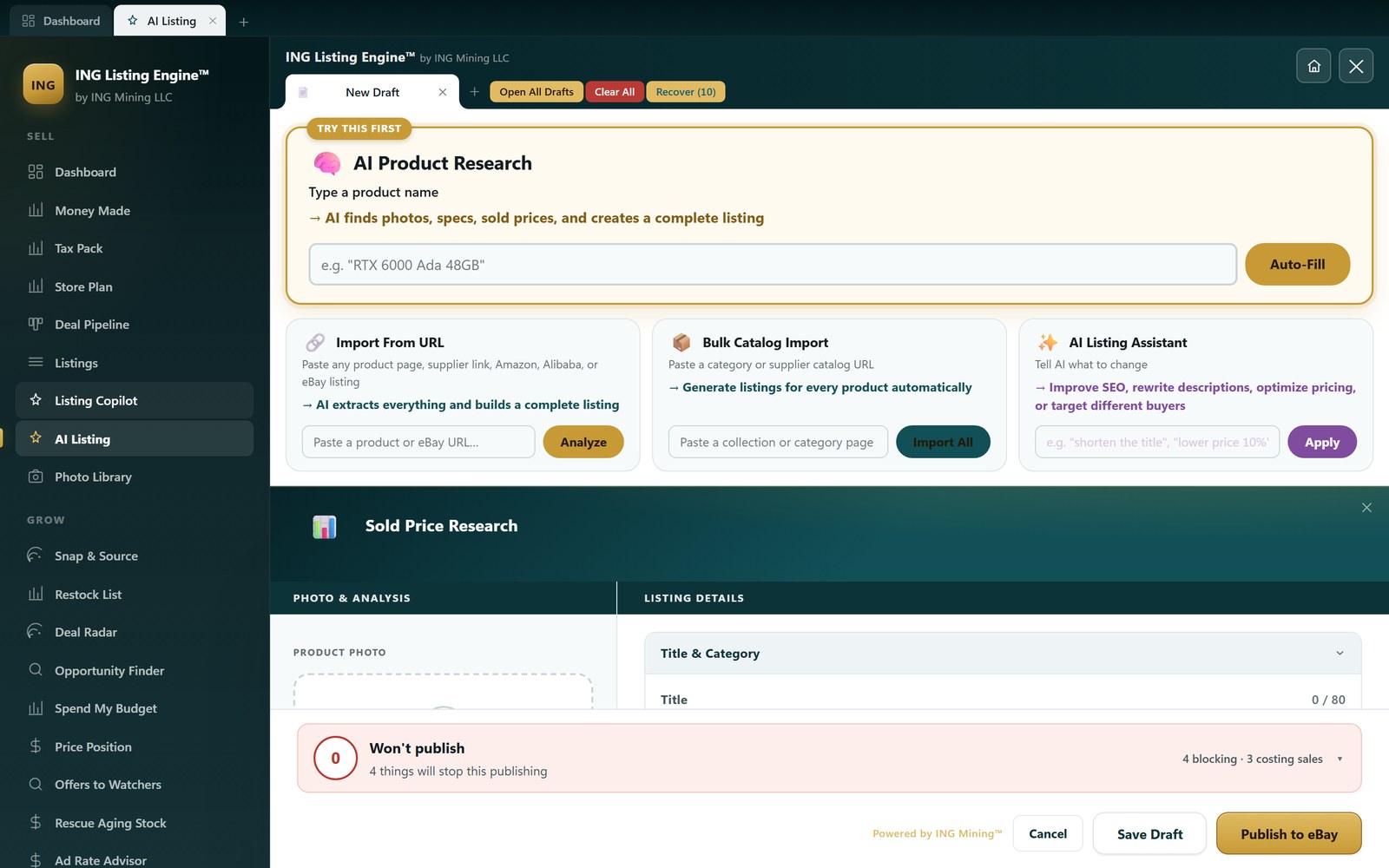
Everything above describes a tool that turns up knowing nothing about you. Since 4 August — in the 2.5.0.0 build now on the download page — one part of it doesn’t. The pre-publish check could already fill brand, part number, ZIP and packed dimensions from a single button. The field it could never fill was the category, and that was the expensive one.
eBay won’t publish without a category, and required item specifics are defined per category — so until that box is answered, the check can’t tell you what else the listing needs either. One empty field was holding up the whole thing. It was also pure retyping: someone who has listed forty Antminers has made that exact decision forty times, and the forty-first listing still opened on an empty search box.

What gets remembered, and where it lives
Only successful publishes and accepted drafts are recorded. A category typed into a draft you then abandoned isn’t a decision, it’s a keystroke. Each row is the title plus the category eBay actually accepted it under, in a SQLite table on your own machine. Rows collapse on the significant words of the title, sorted, so listing the same model forty times is one row with a count of forty rather than forty rows saying the same thing. The table is capped at 500 rows and pruned oldest-first; the matcher is handed the most recent 250. A category ID that isn’t all digits is discarded rather than stored, because a display name sitting in the ID field would teach the app to suggest something eBay can’t publish.
How a title gets matched to one you’ve already filed
The matching is deliberately literal, and worth spelling out, because "AI picks your category" usually means a model guessing:
- The title is cut into words. Single characters go — the "x" in "16 x 9" is punctuation wearing a letter — and so do bare numbers under three digits, because a quantity, a size and a year of manufacture are all "12".
- About ninety filler words are dropped outright: new, used, oem, genuine, free, fast, shipping, lot, set, pcs, bundle, tested, sealed, mint, refurbished, rare, vintage and the rest of that vocabulary. Counting them would make "New Sealed Lot Free Shipping" match everything you have ever listed.
- What’s left gets weighted. A word carrying both letters and digits is a model number —
s19j,rtx4090,110th— and scores 3. A bare number scores 2. A plain word scores 1. - The score is how much of the new title the closest past one covers. Measured that way round, a long, detailed past title isn’t punished for carrying detail the new one lacks.
On a real completed listing — "* LOT Of 10 Miners * Bitmain Antminer S19 Pro 110TH/s Bitcoin - Tested/Working" — fourteen words go in and eight come out: of miners bitmain antminer s19 pro 110th bitcoin. Two of those eight, s19 and 110th, are model numbers, and they carry half the total weight of the title between them.
The scoring is pure and self-contained — no database call, no model, no clock — so it can be reimplemented from the shipped constants and run outside the app, which is what the table below is. The stand-in history is eighteen real completed eBay listings, six each of miners, servers and laptops, filed under three categories:
| A title it has never seen | Score | What it does |
|---|---|---|
| Bitmain Antminer S19 Pro 110TH/s Bitcoin Miner PSU Included Tested Working | 0.85 | Offers the mining category, high confidence |
| Lenovo ThinkPad T480 i5-8350U 16GB 256GB SSD Windows 11 Pro | 0.65 | Offers the laptop category, high confidence — matched off an X1 Yoga, a different model in the same aisle |
| Dell PowerEdge R740 2x Xeon Gold 6132 384GB RAM No HDD | 0.33 | Offers the server category, but only at medium |
| Vintage Pyrex Mixing Bowl Set Of 4 Primary Colors | — | Silent |
| New Sealed Lot Free Shipping Genuine OEM Part | — | Silent |
Four gates, and why silence is the normal answer
- One shared word is not evidence. The words two titles share have to total a weight of at least 2, so a single plain word in common never qualifies. That’s exactly why the last row above is silent: every word in it but one is on the filler list, and one plain word weighs 1.
- Below 0.30 coverage the two titles aren’t about the same kind of thing, and nothing is offered at all.
- A near-tie is a coin flip, not an answer. If the runner-up category lands within 0.05 of the winner, nothing is offered — two categories neck and neck means you have filed items like this both ways, and choosing for you would be the app inventing a decision you never made. This gate is hard to trip on purpose: I had to hand-build an ambiguous title, "Antminer Dell Power Supply PSU Server Mining 1200W", before the miner and server histories tied at 0.40 apiece and it went quiet.
- A category you’ve already chosen is never suggested over, and the check refuses again on the way in rather than trusting the browser to have behaved.
Silence is the expected answer for something you haven’t sold before, and it costs nothing — the form behaves exactly as it did before the feature existed. That’s the trade the whole design makes. A wrong answer puts your listing in the wrong aisle and hangs the wrong required specifics off it, so every close call resolves to saying nothing.
When your history has nothing, eBay answers — and never at full confidence
On the first listing of something new there’s no history to read, so eBay’s own taxonomy suggestion fills the gap. It arrives at medium confidence and marked as an estimate, never at high, because eBay is guessing from the same title string the app is — and guessing without knowing what you sell. Your own history, when it has an opinion, outranks it.
The obvious way this goes wrong
It inherits your mistakes. If you’ve been filing S19s somewhere buyers don’t browse, the forty-first listing gets handed that same category, in a chip quoting one of your own titles back at you — "where you put 6 listings like this". That is more persuasive than an empty box, not less, which is precisely what makes it worth watching. It’s a memory, not a judgement, and the two-second glance described in the next section applies harder here than anywhere else on this page.
It also only understands "like this" as word overlap. Two items that share a model number and belong in different aisles — a laptop and that laptop’s docking station — look similar to it. The shared-weight gate catches most of that. It’s a filter, not a proof.
Two related things shipped the same week and aren’t this section’s subject: a title miner that reads eBay’s own Best Match and sold results to name the words your title is missing, rather than rearranging the words already in it; and a price-position board that ranks a live listing against whatever is competing with it right now on delivered price. The nearest guides to each are the title rules the audit applies, published in full and writing prices to live listings. The pre-publish check itself, category row and all, is walked through screen by screen in how to use ING Listing Engine.
Where it breaks, and what to check every time
It cannot know whether something works
A photo shows cosmetic condition. It cannot show that a unit powers on, holds a charge, or hashes at its rated speed. You assert “tested and working” — never let a tool assert it for you. That’s an accuracy problem and an eBay policy problem at the same time, and it’s the one that generates returns.
It can invent specs on unfamiliar items
Given a rare or ambiguous item, a weak tool fills gaps with plausible-sounding values. Blank is better than wrong. Verify model numbers and technical specs against the actual item, especially anything over about $200 where a wrong spec turns into a not-as-described case.
Category choice is quietly high-stakes
Category drives both which specifics eBay requires and whether buyers filtering by category ever see you. It’s usually right, and a two-second glance catches the times it isn’t. Skipping that glance is how listings end up invisible.
The price is the market’s number, not yours
A comp-based recommendation says what the market has paid. It doesn’t know what you paid. Treat it as the ceiling and apply your own floor.
None of this argues against AI listing — it argues for keeping the review step. Handled that way, AI-assisted listings sit comfortably inside eBay’s rules, because eBay’s policies govern what a listing says, not which tool typed it, and a human is still signing off on every word.

How to choose — and when a competitor is the better answer
Judge candidates on the things that change outcomes:
- Identification accuracy on your inventory. Test it with three awkward items, not the demo item.
- Pricing methodology. Does it show comp count, median, and spread — and does it exclude parts listings? Ask this specifically.
- Review-first design. Every field visible and editable before anything reaches eBay.
- Official API publishing, not copy-paste or browser automation.
- Where your data and keys live, and whether they’re encrypted at rest.
Being straight about it, here’s where other tools genuinely beat a single-marketplace AI lister:
- Vendoo and List Perfectly are better if your real problem is cross-posting the same inventory to Poshmark, Mercari, Depop, Etsy and eBay and keeping quantities in sync. Breadth across marketplaces is what they’re built for, and an eBay-focused tool won’t match it. We wrote the full comparison up rather than leaving it at one line — see Vendoo vs an eBay-only tool, feature by feature, including the five things Vendoo does better. The same question against List Perfectly gets its own page, including the categories where our own sold-comp data has nothing useful to say.
- Terapeak is better for authoritative eBay sold data in mainstream catalogued categories — it’s eBay’s own data, Product Research is free with any seller account (only Sourcing Insights needs a Basic Store or above), and its filters are solid.
- eBay File Exchange is better if you already have clean, structured catalogue data and just need to push thousands of rows. It’s free and it’s a firehose. It’s also miserable for one-of-a-kind used goods, which is precisely the gap AI listing fills. It is now called Seller Hub Reports, and it is what eBay offers anyone still looking for Turbo Lister.
The case for an AI listing tool is narrower and, we’d argue, deeper: varied, unbranded, or technical inventory where the bottleneck is describing the item at all — and where the sold-comp data is messy enough that filtering it properly is the whole job. If that’s not your bottleneck, use one of the above instead.
Getting started
- Connect your eBay account so drafts publish through the official API. The dashboard then reads your real inventory — how the connected store view works.
- Add an AI key. You supply your own, so you pay the model provider directly rather than a per-listing markup.
- Drop in a photo, or type a product name, and let it draft.
- Review every field. Condition, specs, category, price floor.
- Publish, then look at what to list next — the Opportunity Finder ranks candidates by sell-through and estimated profit.
Try it on your next listing. The ING Listing Engine turns a photo or a product name into a complete, comp-priced eBay draft you review and publish. It’s free during the public beta, for Windows, with no paywall — download the ING Listing Engine, or read more about it on the ING Listing Engine home page. Setting it up runs about ten minutes — the setup guide covers the Claude key you bring yourself and the eBay connection it needs.
Common questions
Is using AI to write eBay listings against eBay’s rules?
No. eBay’s policies govern what a listing says — accuracy, condition honesty, prohibited content — not the tool used to write it. Because you review and approve every draft before it publishes, you remain responsible for its accuracy, which is exactly what eBay requires. The risk isn’t “AI wrote it,” it’s “nobody checked it.”
How accurate is identification from a photo?
Strong on items with a visible brand, model plate, or part number. Weak on unmarked or ambiguous items, where a good tool should leave fields blank instead of guessing. Test it on your own hardest items before you trust it on volume.
Does it set the price for me?
It recommends one from comparable sold listings, anchored to the median with parts and mismatched models filtered out — as in the S19 example above, where correct filtering moved the answer from $69 to $290. It can’t know your cost basis, so the floor is yours.
Do I still have to review every listing?
Yes, and it’s about two minutes. Condition claims and technical specs are where the money and the policy risk both sit.
Can it fix listings I’ve already published?
Yes. It reads every live listing, reports what’s wrong across the whole account, and rewrites title, description and item specifics as drafts you publish yourself — scanning on its own never changes anything. Expect the first audit to overstate the problem: on our own 88-listing account it proposed 35 changes and only 2 survived checking.
What does it cost?
Pricing models vary across the market — per listing, per month, or bring-your-own-key. The ING Listing Engine is free during the public beta; you supply your own AI key and pay the model provider directly for usage. What every model in this market actually charges, and what a listing costs once you divide by volume, is worked through in what AI listing software really costs.
Deep dives in this topic
- AI eBay listing from a photo: what it reads and what it can’t — the six fields a photo can never tell you, and how to shoot the spec plate so identification works.
- AI Quick-Fill: type a product name, get a complete listing
- Opportunity Finder: what’s worth listing next
- Working from a real, connected eBay store
- Terapeak alternatives for product research — why keyword-matched sold averages are usually wrong, tested on 864,000 rows.
- eBay repricing software — pricing the listings you already have live, against the same comp data.
- AI listing software cost — every vendor’s real 2026 price, divided by listings, and the arithmetic behind a bring-your-own-key bill.
- Why an eBay listing is not showing in search — the seven mechanical causes, ranked by how fast you can rule each one out, and the title finding from 37 sold comps.
- eBay listing optimization — the audit rules in full, applied to 89 listings that are already live, including the rule that gets a title wrong.
- Ending an eBay listing, and what you can still change — eBay’s end-early and revision rules read off its own help pages, plus the revision that reported success and changed nothing.
Filed under AI Listing · Tagged Sold comps, Photos & vision AI, Competitor comparisons, Automation · Browse all guides by topic