

eBay listing optimization means something different once the listing is already live. Writing a good listing from scratch is a blank page. Fixing one that has been up for eight months is a live object with watchers on it, a sales history behind it, and a real chance of making it worse. Nearly everything written about this treats the two as one job. They are not, and the difference decides which changes are worth making — so this page is only about the second one. If you are writing listings that do not exist yet, that is the AI eBay listing software guide instead.
What a free scan can actually see
We ran this against our own store on 29 July 2026. Eighty-nine live listings, read straight from eBay, in a little over two seconds. It flagged eight of them and proposed two business-policy renames. It changed nothing, because reading and writing are separate operations and the read one cannot touch anything.
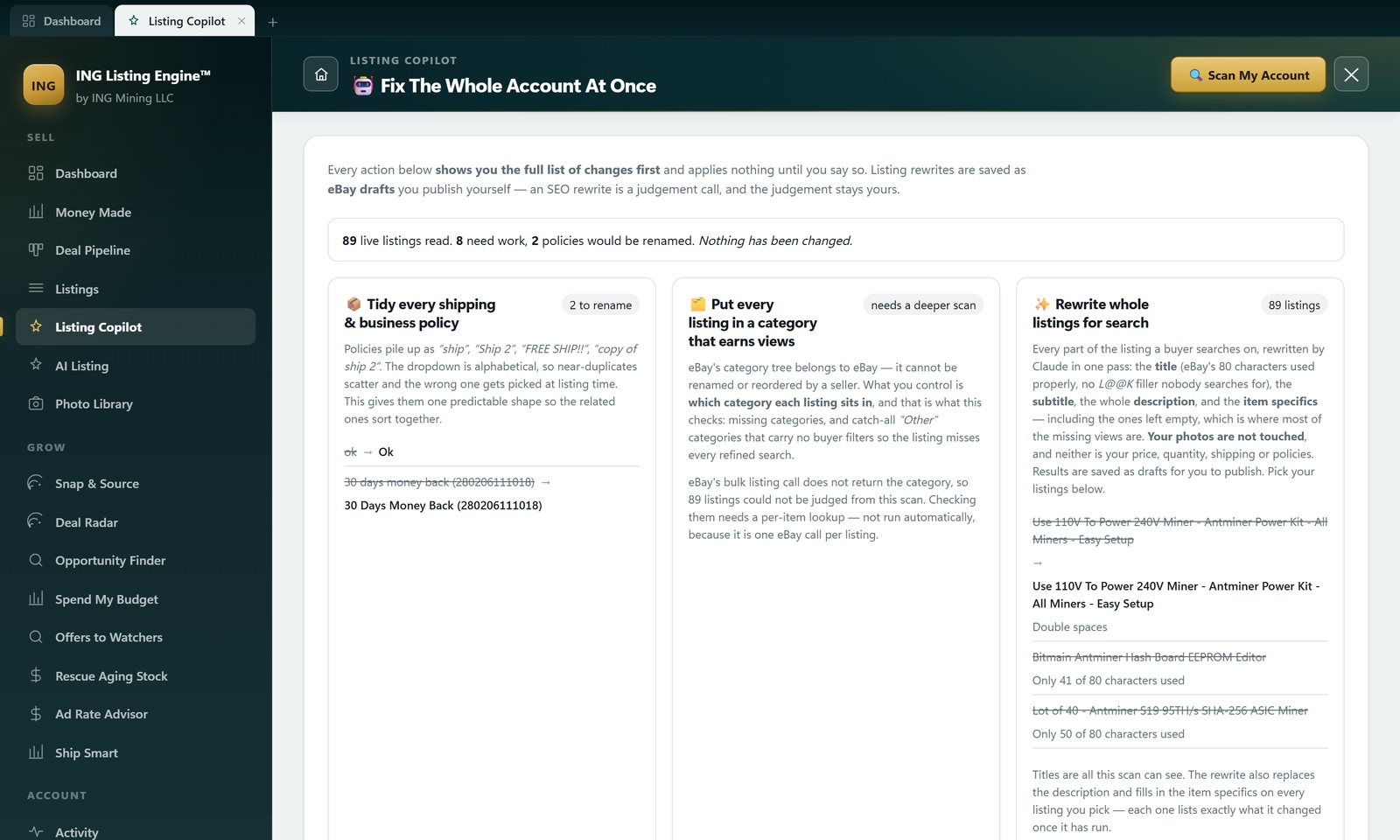
Eight out of eighty-nine is a deliberately small number. Point any bulk auditor at a live store and it will find things; the useful output is the short list you get after the tool has been taught the difference between a fault and a field it failed to fetch. That correction cost us thirty-three false proposals on the first run, and the whole 35-proposals-to-two story is written out there — the short version is that a tool handing you forty urgent fixes is usually describing its own problems.
The middle card is the part worth stealing. eBay’s bulk listing call does not return the category at all. Not “no category” — the field simply is not in the response. Treating that absence as a fault reported every single listing in the account as broken, confidently and wrongly. So the card says what it actually knows: 89 listings could not be judged, and checking them means one eBay API call per listing, which is not something to fire off silently. An honest “I don’t know” from a tool is worth more than a number it made up.
The title rules, published in full
Most listing-optimisation tools score your title and will not tell you how. Here is the entire deterministic pass, which is worth knowing whether or not you ever run it:
| Rule | What it flags |
|---|---|
| Over the limit | More than 80 characters. eBay truncates it and the tail never indexes. |
| Under-spent | Fewer than 60 characters — free keyword space going unused. |
| Filler | Eighteen words nobody searches: L@@K, look, wow, rare, hot, nice, great, best, top, new listing, free shipping, fast shipping, must see, !!!, $$$, read, nr, no reserve. |
| Shouting | Three or more runs of four-plus capitals. eBay search is case-insensitive, so capitals buy nothing and cost readability. |
| Double spaces | Wasted characters inside an 80-character budget. |
The two most common findings on our own account were both boring, and both real. Four titles were simply short — Bitmain Antminer Hash Board EEPROM Editor at 41 characters, Lot of 40 - Antminer S19 95TH/s SHA-256 ASIC Miner at 50, Pinecone Matches IniBox 850 Mh/s 500W US Stock at 46. And one was three words: “Fanuc Teach Pendant”, 19 characters of 80.
That one is worth sitting with, because the same account also has this live: Genuine OEM FANUC A05B-2301-C315 Teach Pendant - New Open Box Fully Tested Japan — exactly 80 characters, carrying the OEM part number, the condition and the origin. Same seller, same category, same week. One of those two gets found by somebody searching a part number and the other does not. The evidence sits in why an eBay listing does not show up in search: 37 sold PowerFlex comps, and a part number in all 37 titles.
Where our own rule is wrong, and it is in the screenshot
Two of the eight flags are the tool being stupid, and they are on screen rather than quietly fixed before the shot. It proposed turning New Antminer S19 - Top Cover - Antminer S19j - All Models into New Antminer S19 - Cover - Antminer S19j - All Models, because “top” is on the filler list. On a top cover, “top” is the part name.
The cause is that the filler rule matches letters, not words. Run the same rule over titles this seller could plausibly write and it does this:
| Title | What the filler rule does to it |
|---|---|
| Dell Latitude 5420 Laptop i7 16GB 512GB SSD | Dell Latitude 5420 Lap i7 16GB 512GB SSD |
| M8 Threaded Rod 316 Stainless Steel 100mm | M8 Th ed Rod 316 Stainless Steel 100mm |
| Desktop Tower PC Intel Core i5 32GB RAM | Desk Tower PC Intel Core i5 32GB RAM |
It needs a word boundary and it will get one. Until then it is a suggestion sitting next to the original with an arrow between them, which is the only reason it is survivable: nothing here auto-applies, and the seller reading that arrow spots “Top Cover” in a second. That is the actual argument for the review step — not that the model might hallucinate, but that a plain deterministic string rule written by a human gets it wrong too.
Item specifics are the part that pays
Titles are what a free scan can read, and they are not where most of the missing views are. eBay builds the refinement filters on a results page out of item specifics. A listing with a blank Model is not ranked lower when a buyer ticks that filter — it is excluded from the result set. The rewrite pass fills them, along with the subtitle and a full HTML description, and it judges the listing as one object rather than field by field, because the item whose title is already fine is usually the one whose description is worst.
There is an asymmetry underneath that, and it is written into the model’s instructions in these words: a missing item specific only costs a search filter; a wrong one gets the seller an item-not-as-described return, the item back, and a defect on their account. So the prompt carries an explicit block forbidding any measurement, capacity, speed, wattage, compatibility, part number or year the listing does not already state, any scarcity language, and any condition claim more flattering than the seller’s own. Filling blanks pulls one way; that pulls the other.
The unglamorous one: your business policy names
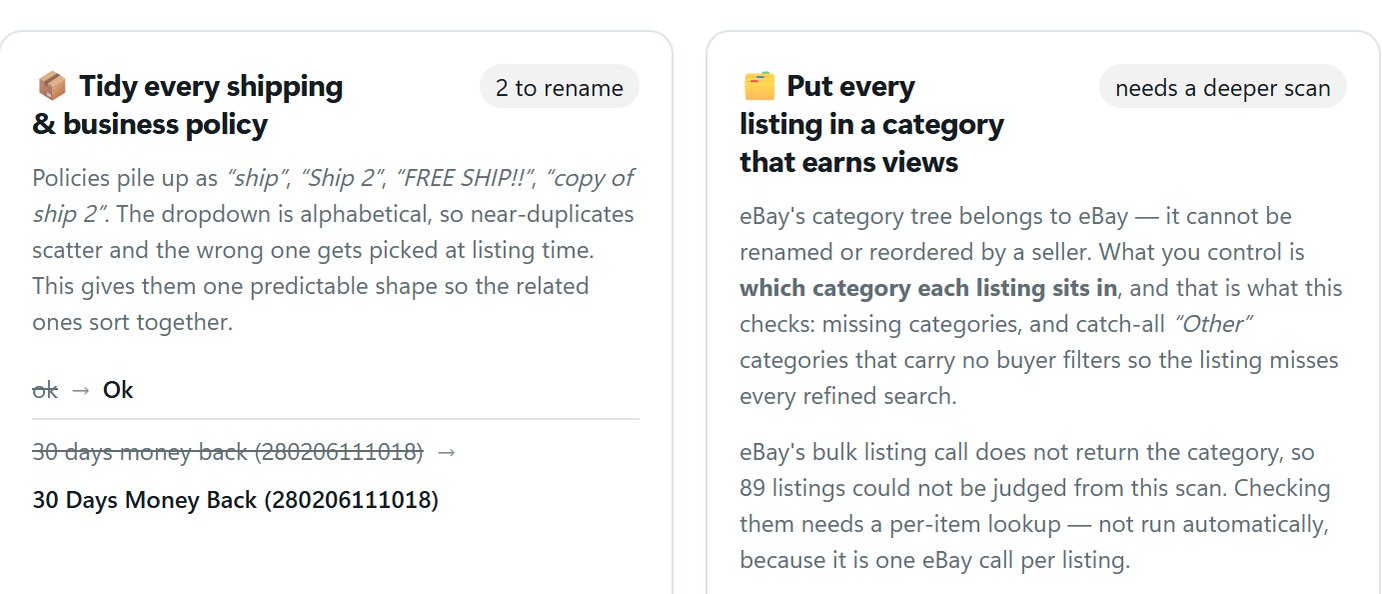
Policies accumulate as “ship”, “Ship 2”, “FREE SHIP!!”, “copy of ship 2”. The dropdown you pick from at listing time is alphabetical, so near-duplicates scatter and eventually you attach the wrong one to something heavy. Giving them one predictable shape sorts the related ones together, which is the whole benefit — it is not cosmetic.
Getting that safe took more care than the feature deserves, and the rules are all in that screenshot. Acronyms keep their shape, so UPS does not become Ups. A word that already mixes upper and lower case was capitalised on purpose, so SurePost and PayPal are left alone. Only a parenthesised one- or two-digit suffix counts as a copy index — which is why 30 days money back (280206111018) keeps its brackets, and why a shipping policy named after its price does not get split into “$329.” and “99”. And if two policies would end up with the same name, the second gets numbered, because eBay rejects duplicate policy names outright and a plan that produced one would fail halfway and leave the account half-renamed.
One trap worth knowing if you are automating this yourself against eBay’s Account API: the PUT replaces the whole policy object. Sending just a new name blanks every shipping service, rate and handling time on it. The rename has to read the policy back, change one field and send the whole thing.
What it will not touch
Anything that can rewrite a whole account can wreck one in a single click, so the boundaries are enforced in code after the model answers rather than asked for in the prompt:
- Photos. The model is never shown the image list and is told to return an empty array — a list it cannot see is a list it cannot rewrite — and the live listing’s own photos are put back on the draft afterwards regardless, in their original order.
- Money and postage. Nineteen commercial and logistics fields are copied back from what eBay returned: price, quantity, package type, item location, best-offer settings, per-buyer limits, private-listing and charity fields. On a half-written draft in the editor, fill-if-blank is useful. On a live listing it is not.
- Publishing. Every rewrite lands as a draft. When one is pushed back onto a live listing, eBay’s own revision rules decide which of those fields it will accept. The request takes an explicit list of listing IDs, so there is no “improve everything” instruction the API can receive.
- Your attention. Each listing comes back with a one-line summary — “New title, description rewritten, 11 item specifics filled in. Photos unchanged.” — over field-by-field detail. Filled, changed and removed are told apart on purpose: a specific that disappears is a buyer filter your listing falls out of, and it is the one outcome most worth catching before you publish.
There is also a Stop after this listing button, which appears only while a run is going. It finishes the one in progress rather than throwing it away, because that one is already paid for.
Where it stops
Category and condition are still the model’s to change. They are search fields and this writes drafts, so that is deliberate — but it is a wider blast radius than the on-screen promise about price, quantity, shipping and policies spells out, and it is the thing to check first in the diff.
It costs a Claude API call per listing, on your own key. Eighty-nine listings is eighty-nine calls. The app is free; the model is not, and what that arithmetic looks like is broken down on the AI listing software pricing page. Rewriting one listing first to see what it does is the point of the checkbox picker.
Do not rewrite a listing that is selling. Performance is evidence; an audit score is an opinion. It is the same trap that makes automated price cuts dangerous, worked through in full on eBay repricing software.
And if you have five listings, do not use any of this. eBay’s own Revise Item is free and takes two minutes, and Seller Hub’s Listing Quality Report under Performance is a decent free second opinion on which of your listings is underperforming. Software earns its keep at dozens, where the honest alternative is that the rewrite never happens at all.
Getting it
ING Listing Engine is a free Windows desktop app in open beta — no paywall, no card. You supply your own Claude API key and connect your eBay account, and the scan described above is read-only and costs nothing to run. The installer on the download page was rebuilt on 29 July 2026 and this feature is in it. Download ING Listing Engine, or read how to set it up first.
Common questions
Does optimising an eBay listing reset its search ranking?
Revising an already-indexed listing does not remove it from search. Revising one that has not been indexed yet — under about 24 hours old — sends it back to the end of the indexing queue. Make your changes in one pass rather than fifteen, then leave it alone for a day.
Is it safe to rewrite all my eBay listings at once?
Only if nothing is applied without you reading it. That is why the scan and the rewrite are separate operations here, why the rewrite produces drafts rather than live revisions, and why it takes an explicit list of listing IDs. Treat any tool that offers a single button to fix your whole store as a tool that can also break your whole store with the same button.
What actually gets changed in a rewrite?
Title, subtitle, the full HTML description and the item specifics — including the ones left empty. Photos, price, quantity, shipping and business policies are copied back untouched. Category and condition can change, which is worth checking in the diff before you publish.
How long should an eBay title be?
Use the whole 80 characters, and spend them on words buyers type: brand, model, part number, capacity, condition. Nineteen characters is not a title, it is a note to yourself. Unused characters are the cheapest optimisation on this page and the one most sellers skip.
Do item specifics really matter that much?
Yes, and more absolutely than most sellers assume, because eBay builds the refinement filters on a results page out of them. A listing missing a specific a buyer filters on is not ranked lower for that search — it is not in it.
Is there a free eBay listing optimization tool?
eBay’s own Listing Quality Report is free and lives in Seller Hub under Performance; it will tell you which listings are underperforming and which specifics are missing. It will not rewrite anything for you. This app is free too, but the AI rewrite bills to your own Claude key, so “free” means the software rather than the tokens.
Filed under AI Listing · Tagged Automation, Dirty data · Browse all guides by topic