

eBay listing software for Windows used to mean a program: a thing you installed, that kept your listings on your own disk, and that worked the day the vendor lost interest. Almost nothing sold under that name today is one. Most of what you’ll find is a website with a subscription, or a browser extension riding on top of eBay’s own pages — and for a lot of sellers that is genuinely the right buy. The job of this page is to tell the three shapes apart and be straight about which seller each one fits.
My position first, so you can discount it: I sell Bitcoin miners, servers and industrial gear on eBay, and I’m the developer behind ING Listing Engine, a free Windows desktop app that writes and prices eBay listings. But we also run the same engine as a web app in a browser, because the desktop shape has a real cost we kept watching people hit. Shipping both is what this comparison is built on — not a belief that one shape is holy.
The three shapes: desktop program, browser extension, web app
A desktop program installs on your PC and does its work there. Your listings, photos and connection credentials live in files on your own machine; the vendor’s server is something it talks to, not somewhere you live. eBay itself no longer makes one — its own desktop lister was retired years ago and never replaced, and what replaced eBay’s own desktop lister is its own story — so everything in this shape today is third-party, and the field is small.
A browser extension installs into Chrome and drives the marketplace’s own listing form — it fills eBay’s boxes the way you would, just faster, and usually cross-posts by opening the next marketplace’s form and filling that too. It runs anywhere Chrome runs, including a Mac or a Chromebook, and the trade-offs that come with it are real but specific; the List Perfectly comparison walks through a worked example of that architecture rather than repeating it here.
A web app is a website: nothing installs, your inventory lives on the vendor’s servers, and it works from any device with a browser — several in this shape ship real phone apps too, like the eleven-marketplace tool covered in the Crosslist comparison. It is the shape almost every new listing tool launches in, because one codebase serves every customer on every OS.
None of these is a gimmick. They are three different answers to one question: whose computer does the work, and whose disk holds your business?
eBay listing programs for Windows: what a real program still buys you
Sellers searching for eBay listing programs — and that is the word people actually type — are usually asking for the first shape, sometimes without knowing the other two exist. Here is what the desktop shape genuinely still does better, from the one we ship:
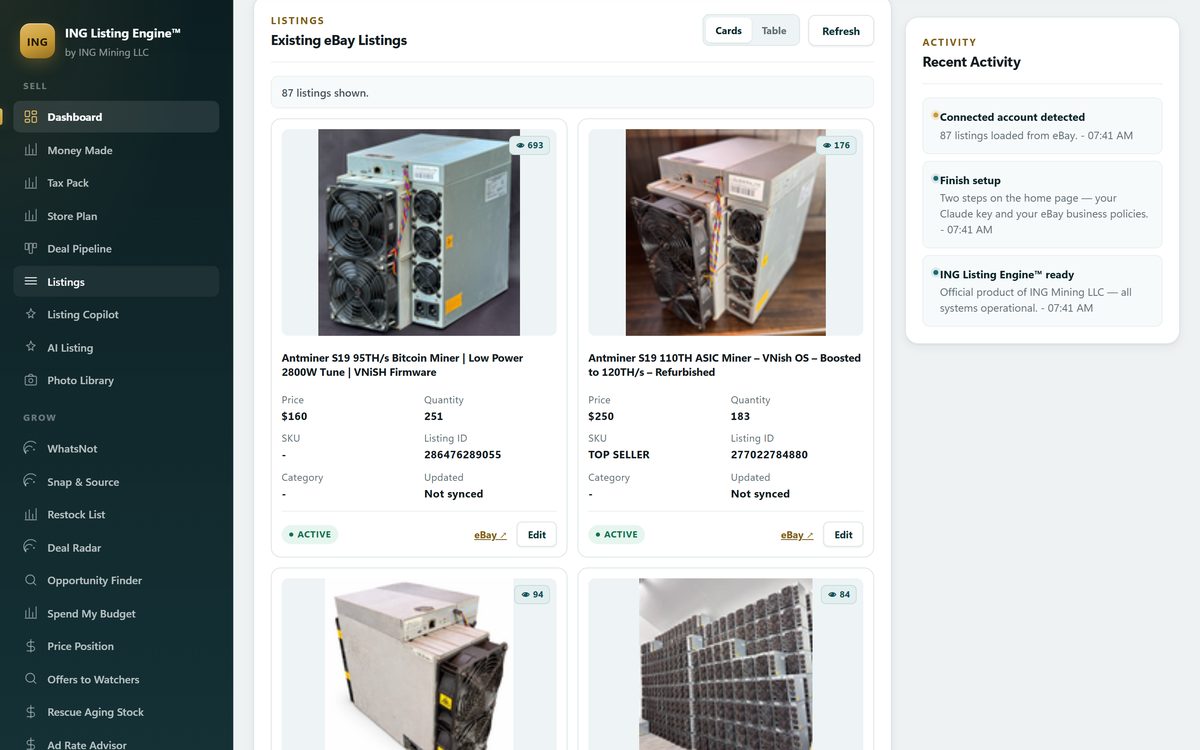
Your data is on your disk. The screen above is a local database: your eBay tokens and API keys sit in a credentials file on your own PC, and your listings, photos and imported inventory live in a database file beside them. If we vanished tomorrow, your records don’t. The full accounting of what the app connects to and what actually leaves your machine is published, because “local” is a claim you should get to audit.
Nothing meters you. Web-based listing tools overwhelmingly price by volume — so many new listings per month per tier. A desktop program has no reason to count: the compute is yours. Our app is free while in beta, and the one running cost is the AI — you bring your own Anthropic API key and pay Anthropic directly, with no markup from us. The honest arithmetic between subscriptions, credits and bring-your-own-key lives on the pricing-models page; the short version is that bring-your-own-key works out around a quarter per listing and wins hardest at low and middling volume.
It can hold your whole store at once. Bulk work — hundreds of photos in a local library, a full repricing pass over every live listing, drafts priced against our own database of completed eBay sales — is the kind of job a native program does without a browser tab’s memory ceiling or an upload step. That is who the desktop shape is for: the seller whose bottleneck is building and pricing eBay listings properly, at volume, on one machine they own.
And the honest costs of the same shape: it is Windows 10/11 only (a 51 MB installer), it lives on the one PC you installed it on, updates arrive by installer rather than silently, and first-time setup is genuinely more work — you connect your own eBay developer access, and eBay grants production API access by support ticket, which typically takes one to three business days. We can’t speed that up, and pretending otherwise would just cost you the wait plus the disappointment.
We ship the same engine in a browser, and the reason is that wait
That one-to-three-day eBay approval is the single biggest reason we built a browser version at all. app.inglisting.com runs the whole thing as a web app: you create an account with an email address and a password — there is no card field anywhere in it — and you’re listing the same afternoon, on any operating system — macOS, Linux, a Chromebook or a tablet.
The difference is who pays for the AI. The browser version runs on our API key, so each account gets five AI generations a day; the Windows download runs on your key and is unmetered. Same engine, different meter:
| Windows desktop app | Browser version | |
|---|---|---|
| Install | 51 MB .msi, Windows 10/11 | None — sign in from any browser |
| Account needed | eBay seller account + your own Anthropic key | eBay seller account + email sign-up |
| AI allowance | Unmetered, on your key, billed by Anthropic at cost | 5 generations a day, on our key |
| Where your data lives | Local database on your PC | Our servers |
| Setup wait | eBay production access: typically 1–3 business days | Minutes |
| Price | Free while in beta, no card | Free while in beta, no card |
Our own advice, and it costs us nothing to give: start in the browser, graduate to the download. Five generations a day is enough to find out whether the listings are good on your inventory, which is the only question that matters. If they are, and you list more than a handful a week, install the Windows app while your eBay production ticket is in the queue: ING Listing Engine for Windows, free while in beta.
There is no Mac build — here’s what Mac sellers actually use
Straight answer, because searches for Mac listing programs are nearly as common as the Windows ones: our download is a Windows desktop application, there is no Mac build and no phone app, and we’re not going to pretend one is around the corner. A Mac seller today realistically picks from three shelves: eBay’s own Seller Hub in a browser, which is free and where eBay has put all of its post-desktop energy; extension-based tools such as List Perfectly, which run wherever Chrome does, Macs and Chromebooks included; and web-first cross-listers such as Crosslist, which add real iOS and Android apps on top. Our browser version also runs fine on macOS, Linux or a tablet — with the five-a-day allowance above, which is honest to call a trial rather than a Mac product.
Which shape should you pick?
Pick a web app or extension if you work across several machines or marketplaces, you’re on a Mac or a phone, or the thing you’re paying for is distribution rather than listing quality. That is most casual and multi-platform sellers, and the two comparisons linked above name tools that do that job well.
Pick a desktop program if eBay is your marketplace, one Windows PC is your workbench, and you want your listings, photos and keys on your own disk with no monthly meter counting your growth. That’s the seller we build for. Try the browser version in the time the installer’s eBay ticket would take you anyway — if five generations a day keeps feeling like a ceiling, that is the signal the download was built for you.
Common questions
Is there still a desktop eBay listing program? Yes, but the shelf is short. eBay retired its own desktop lister and never replaced it, so everything installable today is third-party — ours is free while in beta, and a handful of paid veterans survive. Most products sold as “eBay listing software” in 2026 are web apps or Chrome extensions, whatever the marketing says.
Do eBay listing programs work on a Mac? The installable Windows ones don’t, ours included, and Mac sellers shouldn’t wait for ports that aren’t coming. Extension-based and web-based tools all work on a Mac, and our own browser version runs there with a five-generation daily AI allowance.
Why does the Windows download need my own API keys? Because the app runs on your machine, not ours. Your Anthropic key pays for the AI at Anthropic’s own prices with no markup from us, and your eBay connection is granted to you directly — which is also why first-time setup includes eBay’s one-to-three-business-day production-access wait. The browser version exists so you can skip both while you decide.
Is the browser version the same app as the download? Same engine, different meter and different disk. The browser version needs no install and no card and caps AI at five generations a day on our key; the download is unmetered on your key, and keeps your listings, photos and credentials in a local database on your own PC instead of on our servers.
What does a desktop listing program actually store on my PC? In our case: your eBay tokens and API keys in a credentials file, and your listings, photos and imported inventory in a local database. The sold-comp lookups query our hosted database, so the search term leaves your machine; the integrations page publishes the full list of what connects and what each connection can reach.
Filed under AI Listing · Tagged Automation, Competitor comparisons · Browse all guides by topic